Codeplug
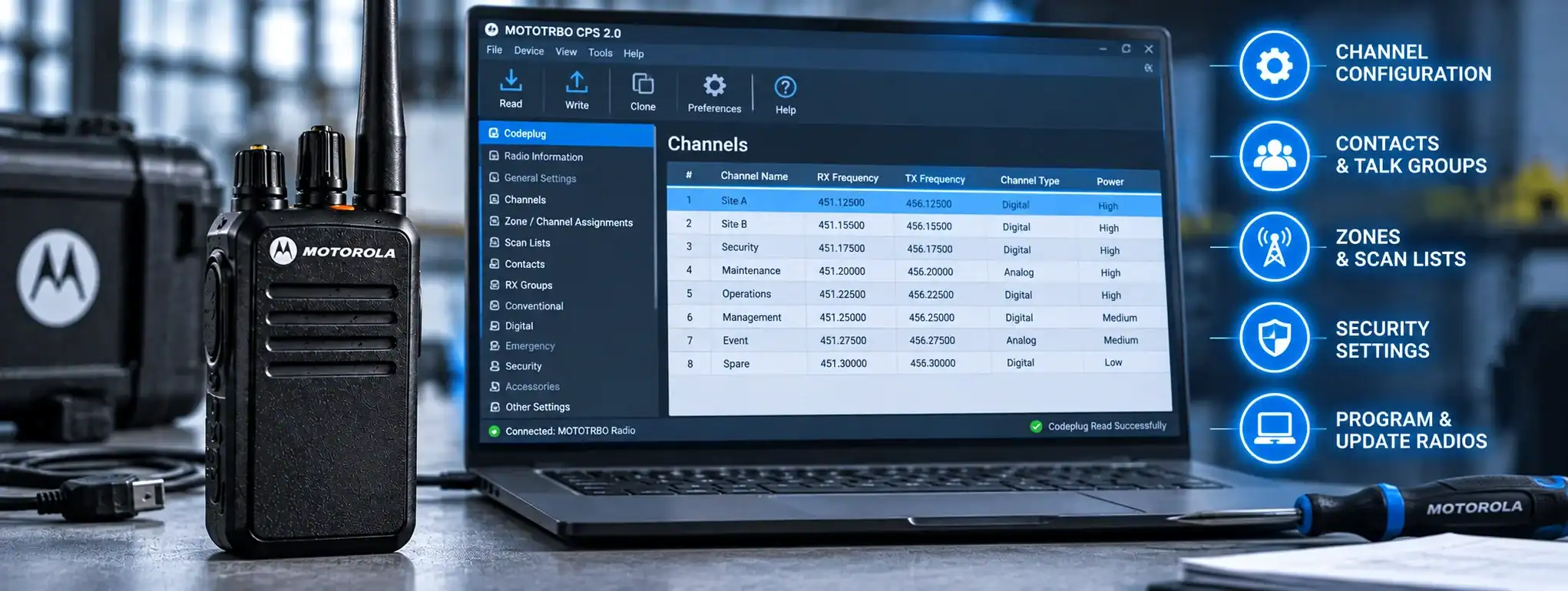
A Codeplug is the configuration file or programming data stored in a two-way radio that determines how the radio operates. It contains the settings that tell the radio which channels, frequencies, communication groups and features are available to the user.
The term is particularly common with professional digital two-way radios, including DMR equipment, where a radio can contain a large number of programmed settings.
A codeplug is normally created or modified using specialist radio programming software and then transferred to the radio. Once programmed, the user can select the configured channels and features without having to enter technical settings manually.
What does a Codeplug contain?
The contents of a codeplug depend on the radio manufacturer, model and type of communication system.
A codeplug can contain settings such as:
- ChannelA two-way radio channel is a programmed set of communication settings, typically including frequency and signalling, that allows compatible radios to communicate with one another. frequencies
- Transmit and receive frequencies
- Channel names
- CTCSS or DCS tones
- Digital signalling
- DMR colour codes
- Timeslots
- Talkgroups
- Radio IDs
- Scan lists
- PowerAn antenna transmits and receives radio-frequency signals, allowing a two-way radio to communicate. Antenna type, frequency, height and location can all affect radio performance and coverage. settings
- Emergency functions
- Individual call settings
- Group call settings
- EncryptionEncryption protects two-way radio communications by converting voice or data into a secure form that can only be understood by authorised radios with the correct encryption capability and keys. settings where supported
- Button assignments
- Display settings
- Other radio-specific functions
Not every radio supports all of these settings.
How is a Codeplug created?
A codeplug is normally created using the manufacturer’s radio programming software.
The programmer selects the required settings and builds a configuration appropriate for the radio systemA Radio System is a complete communication solution comprising two-way radios and, where required, equipment such as repeaters, antennas, base stations, mobile radios and network infrastructure..
For example, a professional radio might be programmed with:
Channel 1 – Security
Channel 2 – Operations
Channel 3 – Maintenance
Channel 4 – Emergency
Each channel can contain the technical parameters required for the radio to communicate correctly.
Once the configuration has been completed, it can be written to the radio.
Codeplug programming
Programming a codeplug involves transferring configuration data between a computer and the radio.
A typical process is:
Programming software → codeplug → radio
The radio is normally connected to the computer using a programming cableA Programming Cable connects a two-way radio to a computer so compatible programming software can configure, update or service the radio's settings., docking station or other manufacturer-approved programming interface.
The exact programming procedure varies between radio manufacturers and models.
Codeplug and radio channels
One of the most important functions of a codeplug is defining the channels available to the user.
A channel entry can contain considerably more information than simply a channel number.
For example, a digital radio channel might specify:
- Channel name
- Receive frequencyAn antenna transmits and receives radio-frequency signals, allowing a two-way radio to communicate. Antenna type, frequency, height and location can all affect radio performance and coverage.
- Transmit frequencyFrequency is the number of cycles a radio wave completes each second, measured in Hertz. In two-way radio, frequency determines where a transmission operates within the radio spectrum.
- Colour code
- Timeslot
- Talkgroup
- Transmit power
- Scan settings
This allows the user to select a named channel while the radio automatically applies the appropriate technical settings.
Codeplug and DMR
Codeplugs are particularly important on DMR (Digital Mobile RadioA Mobile Radio is a two-way radio designed to be installed in a vehicle. It normally uses the vehicle's power supply and an external antenna to provide reliable communication while travelling or working in the field.) systems.
A DMR codeplug can contain settings such as:
- Radio ID
- Talkgroups
- Colour codes
- Timeslots
- Digital channels
- Scan lists
- Contacts
- Individual calling information
- Group calling information
- Emergency settings
The codeplug therefore determines how the radio interacts with the wider DMR system.
A correctly configured codeplug is essential for radios to communicate with the intended users and talkgroups.
Codeplug and Radio ID
On digital radio systems, a codeplug may contain the radio’s unique Radio ID.
The Radio ID allows the networkA Network is a connected system of radios, equipment and infrastructure that allows users to communicate across a defined area. Radio networks can range from simple radio-to-radio systems to large multi-site networks. or other compatible radios to identify the transmitting device.
For example, a DMR system may associate a Radio ID with a particular radio or user.
Correct Radio ID programming is important because an incorrectly configured ID can result in communications being attributed to the wrong radio or prevent certain system functions from operating correctly.
Codeplug and Talkgroups
A codeplug can define the Talkgroups available on a digital radio.
A talkgroup is a logical communication group that allows multiple users to communicate together.
For example, a radio could contain talkgroups for:
- Security
- Operations
- Management
- Maintenance
- Emergency
The codeplug tells the radio which talkgroups are available and how they are associated with the programmed channels.
Codeplug and contacts
Digital radios can have contact lists containing individual radios, groups or other destinations.
These contacts can be stored in the codeplug.
For example, a radio might contain:
- Security Supervisor
- Control Room
- Maintenance Team
The user can then select the required contact when making a supported individual or group communication.
Codeplug and scan lists
A codeplug can contain Scan Lists that determine which channels the radio monitors when Channel ScanChannel Scan is a two-way radio feature that automatically monitors multiple programmed channels for activity, allowing users to hear communications without manually switching between channels. is enabled.
For example:
Supervisor Scan ListA Scan List is a programmed collection of channels or talkgroups that a two-way radio monitors automatically when its scanning function is enabled.
- Security
- Operations
- Maintenance
- Emergency
The codeplug can also determine priority channels and other scanning behaviour, depending on the radio.
Codeplug and radio features
Many programmable radio functions are controlled through the codeplug.
These can include:
- Programmable buttons
- Emergency buttons
- Scan functions
- Channel selection
- Power settings
- Audio settings
- Call functions
- Display behaviour
- Keypad functions
- Lone-worker functions
- Man-down functions
- Encryption settings
The available features depend on the radio model and its software.
Codeplug and repeaters
Where a radio communicates through a repeaterA Repeater receives a two-way radio transmission and retransmits it, usually from an elevated location, to extend the coverage and reliability of a radio communication system., the codeplug contains the settings required to access the repeater.
These may include:
- Repeater transmit frequency
- Repeater receive frequency
- CTCSS or DCS settings
- DMR colour code
- Timeslot
- Talkgroup
- Other access parameters
This means users can simply select the appropriate programmed channel rather than manually entering repeater settings.
Codeplug and analogue radios
Codeplugs are not limited to digital radios.
Many programmable analogue professional radios also use configuration files or similar programming data.
An analogue radioAnalogue radio uses continuously varying radio signals to transmit voice communication. It remains widely used for reliable two-way communication across business, industry, events, security and other applications. configuration may contain:
- Frequencies
- Channel names
- CTCSS tones
- DCS codes
- Transmit power
- Channel bandwidth
- Scan settings
- Other radio functions
The manufacturer may use a different name for the configuration file, but the basic principle is similar.
Codeplug backup
A codeplug can usually be saved as a file on a computer.
Keeping a backup is important because it allows the radio configuration to be restored if the radio needs to be reprogrammed or replaced.
A backup can also make it easier to programme additional radios with the same basic configuration.
However, settings such as radio IDs may need to be changed when creating configurations for multiple individual radios.
Codeplug cloning
Where permitted by the radio manufacturer and system design, a codeplug can be copied or used as the basis for programming another compatible radio.
This can make it considerably faster to configure a fleet of radios with the same channels and communication groups.
However, individual settings such as Radio IDs should normally be unique where the radio system requires them to be.
Simply copying an entire codeplug between radios without checking the individual settings can create configuration problems.
Codeplug and radio fleets
Codeplugs are particularly useful when managing a fleet of professional two-way radios.
A company may have dozens or hundreds of radios that need broadly consistent configurations.
A standard codeplug can provide a common starting point for the fleet while allowing individual settings to be adjusted where required.
This helps ensure that users have the correct channels, talkgroups and features available.
Codeplug versions
It is good practice to keep track of codeplug versions when managing a professional radio fleet.
A radio system may change over time as new channels, users or communication groups are added.
Keeping versioned copies can help identify which configuration is installed on a particular radio and provide a known configuration that can be restored if necessary.
Codeplug and radio programming errors
An incorrectly programmed codeplug can cause a range of problems.
For example:
- Radios may not communicate
- Users may be placed on the wrong talkgroup
- Repeaters may not be accessible
- Scanning may not work correctly
- Users may transmit on an unintended channel
- Individual calling may fail
- Emergency functions may not operate as intended
This is why professional radio programming should be carried out carefully and tested before the equipment is deployed.
Codeplug and licensing
A codeplug may contain the frequencies and other settings associated with a licensed radioA Licensed Radio is a two-way radio operated under an appropriate radio licence. Licensed systems can provide greater control over frequencies, coverage and infrastructure than licence-free radio services such as PMR446. system.
Programming a radio with a frequency does not itself grant permission to use that frequency.
Where a radio system requires an OfcomOfcom (Office of Communications) is the UK's communications regulator. For two-way radio users, Ofcom manages and regulates access to radio spectrum and the use of radio frequencies in the UK. licence, the equipment must be operated in accordance with the relevant licence conditions.
The codeplug should therefore reflect the authorised radio configuration.
Codeplug and encryption
Where supported, encryption settings can form part of a codeplug.
Encryption configuration determines how compatible radios protect and decode encrypted communications.
Because encryption settings can affect the ability of radios to communicate, they must be configured consistently across the relevant equipment.
Encryption should not be confused with simple CTCSS, DCS or talkgroup settings, which do not by themselves provide equivalent protection.
Codeplug and firmware
A codeplug and firmwareFirmware is the software built into a two-way radio that controls its underlying operation, features and hardware. Manufacturers may release updates to improve performance, fix faults or add functionality. are not the same thing.
Firmware is the software embedded in the radio that controls its fundamental operation.
The codeplug contains configuration settings that tell that firmware how the particular radio should operate.
A firmware update may therefore change the capabilities or behaviour of the radio, while a codeplug changes its programmed configuration.
Compatibility between firmware and codeplug versions can be important when programming professional radios.
Codeplug and radio hire
Radio hireRadio Hire is the temporary rental of two-way radios and related communication equipment for events, projects and operational requirements, providing professional communication without purchasing the equipment. companies commonly programme radios before they are supplied to customers.
The codeplug can be configured according to the requirements of the event, project or organisation.
For example, a temporary event radio fleet might be programmed with:
- Event Management
- Security
- Production
- Stewards
- Medical
- Emergency
This allows each radio to be configured for the user’s role before it is issued.
Codeplug and DCS
DCS can create and manage radio configurations appropriate to professional two-way radio systems.
For customers using programmable digital radios, the codeplug can be developed around their operational requirements, including channels, talkgroups, repeaters, scanning and other supported features.
Correct programming ensures that the radios are configured consistently and are ready for the intended communication system.
For demanding environments where reliable communications are essential, professional two way radio hire gives your team the equipment they need.