Fleet Management
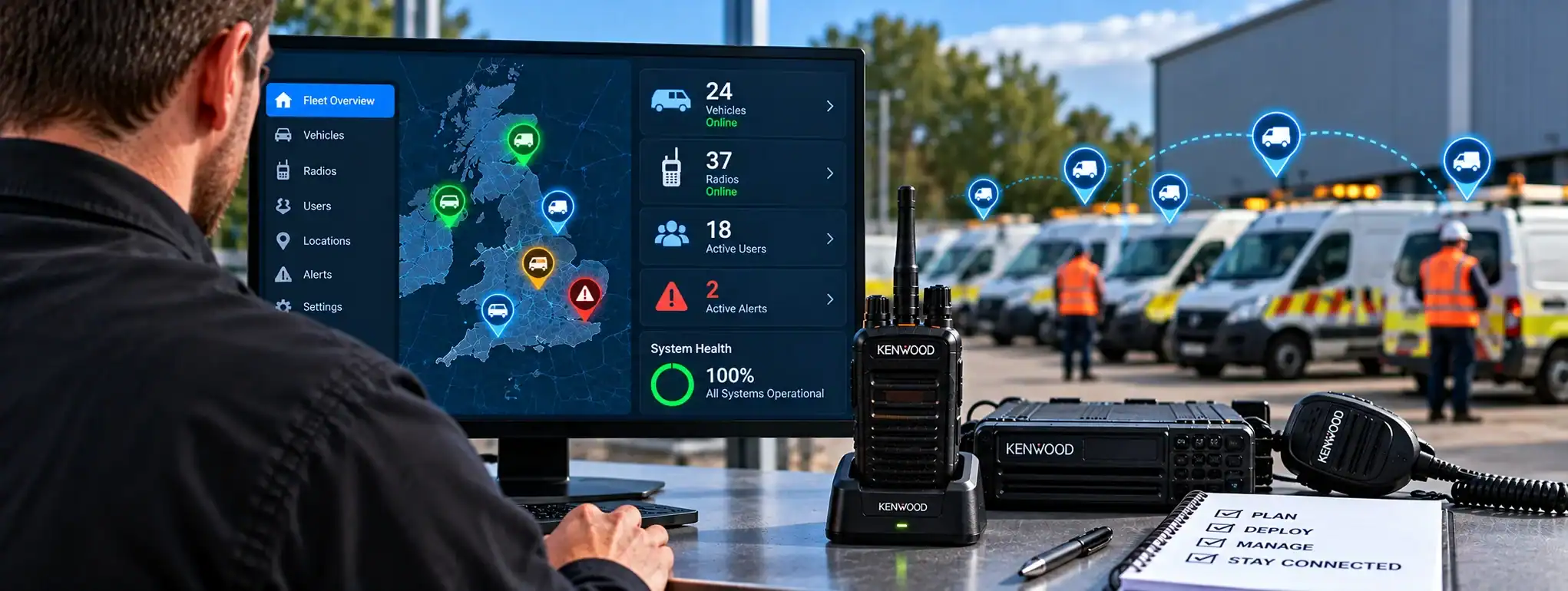
Fleet Management is the process of managing a group, or fleet, of two-way radios and associated communication equipment. It covers the configuration, allocation, maintenance, monitoring and administration of radios throughout their operational life.
In a professional radio systemA Radio System is a complete communication solution comprising two-way radios and, where required, equipment such as repeaters, antennas, base stations, mobile radios and network infrastructure., fleet management helps organisations keep track of which radios are in use, how they are configured, who they are assigned to and whether they are operating correctly.
Fleet Management can range from simple manual administration of a small number of radios to sophisticated software-based systems capable of managing large fleets remotely.
What does Fleet Management include?
Radio Fleet Management can include:
- Radio inventory management
- User and radio allocation
- Radio identification
- Configuration and programming
- FirmwareFirmware is the software built into a two-way radio that controls its underlying operation, features and hardware. Manufacturers may release updates to improve performance, fix faults or add functionality. management
- ChannelA two-way radio channel is a programmed set of communication settings, typically including frequency and signalling, that allows compatible radios to communicate with one another. and talkgroup management
- EncryptionEncryption protects two-way radio communications by converting voice or data into a secure form that can only be understood by authorised radios with the correct encryption capability and keys. key management
- Battery management
- Equipment maintenance
- Fault tracking
- Software updates
- Remote configuration
- Device monitoring
- Lost or stolen radio management
- Equipment replacement
The precise features available depend on the radio technology and management system being used.
Why is Fleet Management important?
As the number of radios increases, manually managing equipment becomes more difficult.
A well-managed radio fleet helps an organisation know:
- Which radios it owns or operates
- Which user has each radio
- Which radios are currently active
- How each radio is configured
- Which firmware version is installed
- When equipment requires maintenance
- Which radios have been lost or removed from service
This can improve operational efficiency and reduce equipment-management problems.
Radio inventory management
An important part of Fleet Management is maintaining an accurate inventory of radio equipment.
An inventory can include information such as:
- Radio model
- Serial number
- Radio ID
- Asset number
- Assigned user
- Department or team
- Date issued
- Current status
- Firmware version
- Accessories issued
For larger organisations, this information can be maintained within dedicated fleet-management software.
Radio ID
Digital radios commonly have an individual Radio ID that identifies the radio within the communication system.
Fleet Management can associate this Radio ID with a particular physical device, user or department.
This can help administrators identify equipment and manage radio permissions.
User allocation
Radios can be assigned to specific employees, teams or operational roles.
For example:
Radio 101 → Security Supervisor
Radio 102 → Security Officer
Radio 103 → Event Control
This makes it easier to identify who has responsibility for a particular radio.
Fleet Management and Codeplugs
A radio’s CodeplugA Codeplug is the configuration data programmed into a two-way radio that defines its channels, frequencies, talkgroups, radio ID and other operating features. contains the configuration that determines how the radio operates within a particular system.
Fleet Management can include maintaining consistent Codeplug configurations across groups of radios.
For example, all security radios might use the same channels and talkgroups while supervisors receive additional communication options.
Fleet Management and radio programming
Programming is a key part of managing a professional radio fleet.
Administrators or radio technicians may need to manage:
- Channels
- Frequencies
- Talkgroups
- Radio IDs
- Scan lists
- Button functions
- Emergency functions
- Audio settings
- Encryption settings
A controlled programming process helps prevent individual radios from becoming incorrectly configured.
Fleet Management and Firmware
Firmware is the software built into the radio that controls its underlying operation.
Fleet Management can include tracking firmware versions and ensuring that compatible radios are maintained appropriately.
For a large fleet, administrators may need to know which radios have received a particular firmware update and which still require updating.
Firmware updates across a fleet
When a manufacturer releases a firmware update, it may need to be deployed across multiple radios.
A controlled fleet-management process can help administrators:
- Identify affected radios.
- Check compatibility.
- Test the update.
- Deploy it to selected equipment.
- Verify operation.
- Roll it out to the remaining fleet.
The exact process depends on the radio manufacturer and management platform.
Fleet Management and Cloud Management
Modern professional radio systems may provide Cloud ManagementCloud Management uses an online platform to remotely manage and monitor compatible two-way radios, users, devices and communication settings from a central location., allowing administrators to manage radio equipment through a web-based platform.
Depending on the system, this can provide remote access to functions such as:
- Device management
- Configuration
- User management
- Software updates
- Radio status
- System administration
Cloud management can be particularly useful for organisations operating radios across multiple locations.
Remote Fleet Management
Some modern radio systems allow equipment to be managed remotely.
This can reduce the need to physically collect radios whenever a supported configuration or software change is required.
Remote management capabilities vary significantly between manufacturers and systems.
Fleet Management and DMR
Professional DMR (Digital Mobile RadioA Mobile Radio is a two-way radio designed to be installed in a vehicle. It normally uses the vehicle's power supply and an external antenna to provide reliable communication while travelling or working in the field.) systems can incorporate Fleet Management functions.
These can include management of:
- Radio IDs
- Talkgroups
- Channels
- Codeplugs
- Encryption
- Firmware
- Users
- RepeaterA Repeater receives a two-way radio transmission and retransmits it, usually from an elevated location, to extend the coverage and reliability of a radio communication system. systems
The exact capabilities depend on the DMR manufacturer and management platform.
Fleet Management and talkgroups
Fleet Management can help control which radios have access to particular Talkgroups.
For example, security personnel may have access to the Security talkgroup, while managers may also have access to Management or Event Control groups.
This allows communication permissions to be structured around operational roles.
Fleet Management and encryption
Where radios use Encryption, Fleet Management can include the administration of encryption settings and, on systems that support it, encryption keys.
Encryption keys require careful management because unauthorised access to them could compromise protected communications.
Lost or compromised radios may need to have their security credentials changed or revoked.
Lost or stolen radios
Fleet Management should include procedures for dealing with lost, stolen or damaged equipment.
Administrators may need to:
- Mark the radio as missing
- Remove it from active inventory
- Disable or revoke access where supported
- Change relevant security credentials
- Issue replacement equipment
- Record the incident
The exact controls available depend on the radio system.
Fleet Management and equipment maintenance
Radios require routine maintenance to remain reliable.
Fleet Management can be used to record:
- Repairs
- Battery replacement
- Software updates
- Firmware updates
- Programming changes
- Equipment inspections
- Faults
- Warranty information
Maintenance records can help identify radios that repeatedly require attention.
Battery management
Radio batteries are consumable components and their performance can decline over time.
Fleet Management can include monitoring battery age, replacement dates and condition.
This can be particularly important for radios used over long shifts or in safety-critical applications.
Accessory management
A radio fleet may include more than the radios themselves.
Associated equipment can include:
- Batteries
- Chargers
- Charging Docks
- Belt Clips
- Earpieces
- Speaker microphones
- Headsets
- Carrying cases
- Vehicle accessories
Keeping track of these items can help ensure that users receive complete working equipment.
Fleet Management and charging
Large fleets may require organised charging arrangements.
A Fleet Management process can establish:
- Which radios require charging
- Where radios are stored
- Who is responsible for charging
- Which batteries are in service
- Which batteries require replacement
This can help reduce the risk of users starting a shift with insufficient battery capacity.
Fleet Management and dispatch
Where a radio system uses Dispatch, Fleet Management can help maintain the relationship between radios, users and operational groups.
A dispatcher may be able to identify individual radios within the system and determine which users or teams they belong to.
Fleet Management and GPS
Some professional radio systems support GPS location.
Where supported, Fleet Management may include managing which radios have location services enabled and how location information is handled.
Location functionality should be configured according to the organisation’s operational and privacy requirements.
Fleet Management and emergency functions
Professional radios can include emergency features such as:
- Emergency ButtonAn Emergency Button is a dedicated two-way radio control that allows users to quickly send an emergency alert to a dispatcher, control room or authorised radio users.
- Emergency AlarmAn Emergency Alarm allows a two-way radio user to quickly alert a dispatcher, control room or other authorised users that assistance may be required.
- Emergency CallAn Emergency Call is a priority two-way radio function that allows a user to quickly request assistance and, on supported systems, establish an urgent voice communication with a dispatcher or control room.
- Man DownMan Down is a safety feature on some professional two-way radios that can detect a possible fall or unusual radio position and automatically raise an alert if the user does not respond.
- Lone WorkerA Lone Worker is someone who works without direct supervision or immediate assistance nearby. Compatible two-way radios can provide safety features such as timed check-ins, emergency alerts and GPS location.
Fleet Management can help ensure these functions are correctly configured on the radios that require them.
Emergency functions should be tested as part of the radio system’s maintenance procedures.
Fleet Management and Lone Worker
Where radios are used by lone workers, Fleet Management can help ensure that compatible devices are correctly configured with the required Lone Worker functions.
The configuration should reflect the organisation’s lone-worker procedures.
Fleet Management and Man Down
Some radios include Man Down functionality that can automatically initiate an emergency sequence when the radio detects a fall or prolonged inactivity.
Fleet Management can help ensure that this feature is correctly enabled and configured on radios assigned to users who require it.
Fleet Management and radio security
Managing a radio fleet also involves controlling who can access the communication system.
Security measures can include:
- Radio identification
- Access permissions
- Encryption
- Secure programming
- User authentication
- Lost-radio procedures
- Configuration control
The appropriate controls depend on the radio system and the sensitivity of the communications.
Fleet Management and standardisation
Standardising radio configurations can simplify fleet administration.
For example, an organisation may establish standard configurations for:
- Security radios
- Management radios
- Maintenance radios
- Vehicle radios
- Control-room radios
This can make replacement and troubleshooting easier.
Fleet Management and spare radios
Maintaining a number of spare radios can help an organisation replace equipment quickly when a radio is damaged, lost or undergoing maintenance.
Spare radios should be kept appropriately configured and maintained so that they can be deployed when required.
Fleet Management and radio replacement
Radios eventually reach the end of their operational life or may become uneconomical to repair.
Fleet Management can help identify equipment approaching replacement and maintain records of replacement equipment.
When a radio is replaced, its user assignment, configuration and relevant security information may need to be transferred or updated.
Fleet Management and radio retirement
When a radio is permanently removed from service, it should be properly retired from the fleet.
Depending on the system, this may involve:
- Removing the radio from active inventory
- Removing its Radio ID from relevant systems
- Revoking security credentials
- Recording its retirement
- Securely handling stored information
The appropriate procedure depends on the equipment and organisation.
Fleet Management for large organisations
Large organisations may operate hundreds or thousands of radios across multiple sites.
A central Fleet Management system can provide a single view of the equipment and its configuration.
This can reduce the administrative burden associated with managing large numbers of devices.
Multi-site Fleet Management
Organisations operating across several locations may need to manage radios centrally while allowing local administrators to manage their own teams.
Cloud-based management platforms can support this type of structure where available.
The precise permissions and administrative capabilities depend on the platform.
Fleet Management and radio hire
Fleet Management is also relevant to temporary radio deployments.
For Event Radio HireEvent Radio Hire provides temporary professional two-way radios and communication equipment for events, helping organisers, security, production and other teams stay connected., for example, a hire company may need to manage large numbers of radios, accessories and batteries for a specific event.
Equipment can be allocated to different teams and checked back into inventory after the event.
Fleet Management and radio hire returns
After a temporary deployment, equipment can be inspected and returned to the available fleet.
This can include checking:
- Radio condition
- Battery condition
- Accessories
- Programming
- Physical damage
- Missing equipment
This helps ensure that equipment is ready for the next deployment.
Fleet Management reporting
Some management platforms can provide reports covering aspects of the radio fleet.
Depending on the system, reports may include:
- Device inventory
- Radio activity
- Configuration
- Firmware versions
- User assignments
- Location
- Maintenance
- System status
Reporting capabilities vary between platforms.
Fleet Management and compliance
Professional radio fleets may need to be managed in accordance with applicable licensing, operational and organisational requirements.
Fleet records can help an organisation maintain accurate information about the equipment it operates and how it is configured.
Fleet Management limitations
Not every radio system provides advanced Fleet Management functionality.
Basic analogue radios may require most management tasks to be carried out manually.
More sophisticated digital and networked systems can provide significantly greater visibility and control.
The available functionality depends on the radio technology, manufacturer and management platform.
Fleet Management and system design
When selecting a Fleet Management approach, organisations should consider:
- Number of radios
- Number of locations
- Number of users
- Radio technology
- Programming requirements
- Firmware management
- Security requirements
- Encryption
- Emergency functions
- GPS
- Remote management
- Maintenance requirements
- Reporting requirements
A small radio fleet may only require a simple asset register, while a large multi-site organisation may benefit from a dedicated management platform.
Fleet Management and DCS
DCS can support organisations with the configuration and management of professional two-way radio fleets.
Depending on the equipment and system architecture, this can include radio programming, fleet configuration, firmware management, equipment maintenance and support for cloud-based management platforms.
The appropriate Fleet Management solution depends on the size of the radio fleet, the equipment being used and the organisation’s operational requirements.