Cloud Management
Cloud Management is the use of cloud-based software and internet connectivity to manage, configure and monitor two-way radio systems, users and devices from a central online platform.
Instead of requiring all radio management functions to be carried out locally on individual radios or computers, a cloud management platform allows authorised administrators to access system information and perform supported management tasks through a web-based interface.
Cloud Management can be particularly useful for organisations operating multiple radios, multiple sites or geographically distributed teams. It can simplify the administration of a radio fleet by providing a centralised view of devices, users and system settings.
How does Cloud Management work?
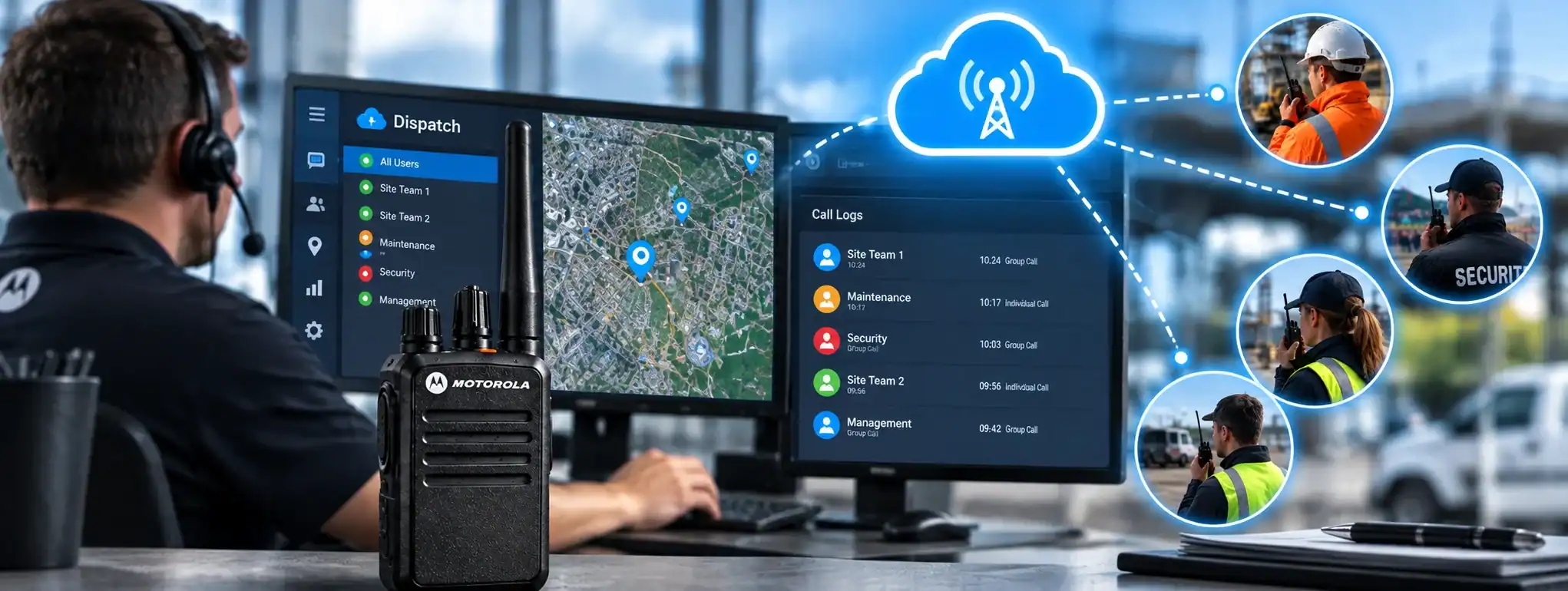
A Cloud Management system connects compatible radio equipment to an online management platform.
A simplified arrangement is:
Radio systemA Radio System is a complete communication solution comprising two-way radios and, where required, equipment such as repeaters, antennas, base stations, mobile radios and network infrastructure. → networkA Network is a connected system of radios, equipment and infrastructure that allows users to communicate across a defined area. Radio networks can range from simple radio-to-radio systems to large multi-site networks. connection → cloud platform → administrator
The administrator accesses the platform using an authorised computer, tablet or other compatible device.
Depending on the system, the platform may allow administrators to manage users, devices, communication groups, configurations, software or system information.
The exact functionality depends on the radio manufacturer, cloud platform and type of radio system.
Cloud Management and two-way radios
Cloud Management can be used with compatible professional two-way radio systems to simplify the administration of radio fleets.
Instead of individually configuring every radio, supported systems can allow administrators to manage certain settings centrally.
This can be particularly useful when an organisation has a large number of radios or needs to make regular changes to the system.
The degree of remote management available varies considerably between radio systems.
Cloud Management and radio programming
Traditional radio programming is often carried out by connecting a radio to a computer and using specialist programming software.
Cloud Management can provide an alternative or complementary approach for compatible equipment.
Depending on the platform, administrators may be able to manage settings such as:
- Radio users
- Device assignments
- Communication groups
- Channels
- Talkgroups
- Permissions
- System settings
- Other supported configuration parameters
Some changes may be applied remotely, while others may still require the radio to be physically connected to programming equipment.
Cloud Management and fleet management
Cloud Management can form part of a wider radio fleet managementFleet Management is the process of managing a two-way radio fleet, including equipment, users, programming, maintenance, firmware, security and radio system configuration. system.
A central platform may allow an organisation to maintain information about the radios it operates, including:
- Device identity
- Assigned user
- Radio model
- Configuration
- Status
- Location, where supported
- Software or firmwareFirmware is the software built into a two-way radio that controls its underlying operation, features and hardware. Manufacturers may release updates to improve performance, fix faults or add functionality. information
- Communication groups
This can make it easier to manage large numbers of devices and keep track of how radios are being used.
Cloud Management and multiple sites
Cloud-based management is particularly useful for organisations operating across multiple locations.
An administrator may be able to manage compatible radio systems at different sites from one central platform.
For example, a company with offices, warehouses or operational sites in different parts of the country may be able to manage its radio fleet without having to visit each location whenever a supported configuration change is required.
The ability to manage multiple sites depends on the underlying radio network and cloud platform.
Cloud Management and remote access
One of the main advantages of Cloud Management is remote access.
Authorised administrators can potentially access the management platform from a different location to the radio users or radio infrastructureRadio infrastructure is the equipment and supporting systems behind a professional two-way radio network, including repeaters, antennas, base stations, network connections, power systems and dispatch equipment..
This can be useful for organisations with:
- Multiple offices
- Remote sites
- Mobile teams
- Regional operations
- National operations
- Centralised IT or communications teams
Access remains dependent on internet connectivity and the availability of the cloud service.
Cloud Management and user administration
A cloud platform may allow administrators to manage the people who use the radio system.
Depending on the system, this can include:
- Creating users
- Assigning radios
- Assigning communication groups
- Changing permissions
- Removing users
- Managing administrator access
Centralising these tasks can make it easier to maintain a consistent configuration across a larger radio fleet.
Cloud Management and communication groups
Cloud Management can provide centralised control of Call Groups or Talkgroups on compatible systems.
For example, an administrator could manage groups for:
- Security
- Operations
- Maintenance
- Management
- Emergency communications
Where supported, changes to group membership or configuration can then be distributed through the radio system.
The exact process depends on the manufacturer and system architecture.
Cloud Management and DMR
Cloud Management can be available with some professional DMR (Digital Mobile RadioA Mobile Radio is a two-way radio designed to be installed in a vehicle. It normally uses the vehicle's power supply and an external antenna to provide reliable communication while travelling or working in the field.) systems.
DMR radios can use features such as radio IDs, group IDs, channels and timeslots, providing a structured digital environment that can be managed through compatible software platforms.
A cloud management system may provide administrators with centralised access to some of these settings.
Not all DMR radios support cloud-based management, and the available functionality varies between manufacturers and systems.
Cloud Management and PoC
Cloud Management is particularly common in Push-to-Talk over Cellular (PoC)Push-to-Talk over Cellular (PoC) provides radio-style push-to-talk communication over cellular or IP networks, allowing users to communicate across wide areas where suitable network connectivity is available. and other broadbandBroadband is a high-speed data connection used by systems such as PoC radio to carry voice, video and other communications over mobile networks, Wi-Fi or IP networks. communication systems.
Because PoC systems already use mobile networks or Wi-FiWi-Fi is a wireless networking technology that connects compatible devices to a local or wider network. In radio systems, it can support programming, updates, data services and IP-based communications. and cloud-based services, users and devices can often be managed centrally through an online platform.
Administrators may be able to manage users, groups, devices and permissions without physically handling each communication device.
Cloud Management and GPS
Some cloud-managed communication systems support GPS or location information.
Where compatible devices provide location data, authorised administrators may be able to view device or user locations through the management platform.
This can help organisations manage mobile teams and understand where communication devices are operating.
Location functionality is dependent on the device, network and software.
Cloud Management and software updates
Some cloud-managed radio systems can provide remote management of software or firmware updates.
Where supported, administrators may be able to identify devices requiring an update and distribute approved software remotely.
This can reduce the need to physically connect every device to a computer.
However, not all radio equipment supports remote firmware updates, and some updates may still require local installation.
Cloud Management and diagnostics
Cloud Management platforms may provide diagnostic or status information about connected devices.
Depending on the system, administrators may be able to see information such as:
- Device connectivity
- Battery status
- Software version
- Device status
- Network connection
- Fault information
This can help identify potential problems before they affect operations.
The level of diagnostic information varies between platforms.
Cloud Management and security
Because Cloud Management provides remote access to radio-system information and potentially configuration controls, security is an important consideration.
Professional platforms may use measures such as:
- User authentication
- Password controls
- Multi-factor authentication
- Role-based permissions
- Encrypted connections
- Access logging
- Secure cloud infrastructure
Administrators should ensure that only authorised personnel have access to the management platform.
Cloud Management and permissions
A cloud management platform may provide different levels of access for different users.
For example:
Administrator: Full system management
Supervisor: Limited operational management
Dispatcher: Communication and dispatch functions
User: Access to assigned communication services
Role-based permissions can help prevent users from accidentally changing important system settings.
The exact permission structure depends on the platform.
Cloud Management and resilience
A cloud-managed radio system can depend on several components working together:
Radio/device → network → internet → cloud service → management platform
If the internet connection or cloud service is unavailable, some management functions may become temporarily inaccessible.
This does not necessarily mean that the radios themselves stop working. Many radio systems can continue operating using their existing configuration even when the management platform cannot be reached.
The exact behaviour depends on the system architecture.
Cloud Management and radio coverage
Cloud Management does not itself increase radio coverageRadio Coverage is the geographical area in which a two-way radio system can provide reliable communication. Coverage depends on the radios, antennas, frequency, terrain, buildings and system infrastructure..
The coverage of conventional two-way radios still depends on the underlying radio system, which may include handheld radios, mobile radios, repeaters and network infrastructure.
Cloud Management is concerned primarily with the administration and management of the system rather than the radio-frequency coverage provided by it.
Cloud Management and Cloud Dispatch
Cloud Management and Cloud DispatchCloud Dispatch is a cloud-based radio management and communication system that allows authorised dispatchers to communicate with, monitor and manage two-way radio users through an internet-connected platform. are related but perform different functions.
Cloud Management is primarily concerned with administering the radio system, users and devices.
Cloud Dispatch is primarily concerned with real-time communication and control of radio users.
A professional communication platform may provide both functions through the same cloud environment.
For example:
Cloud Management → users, devices, groups and settings
Cloud Dispatch → calls, messages, monitoring and dispatch
Cloud Management and radio hire
Cloud Management can be useful when managing temporary radio fleets for events, construction projects, security operations and other short-term activities.
A large number of hired radios may need to be configured for different teams and communication groups.
Where compatible cloud-based systems are used, administrators can potentially manage elements of the fleet centrally rather than relying entirely on local programming.
The availability of cloud management depends on the equipment and system supplied.
Cloud Management and radio system maintenance
Centralised management can make ongoing radio-system maintenance easier.
Administrators may be able to identify devices that require attention, check configurations and apply supported changes without physically collecting every radio.
This can reduce administrative work for larger fleets and help maintain consistent configurations.
Cloud Management for large organisations
Cloud Management becomes particularly valuable as the size and complexity of a radio fleet increases.
An organisation with hundreds or thousands of communication devices may benefit from centralised management rather than maintaining each device independently.
It can also help organisations standardise configurations across different locations while still allowing individual sites or departments to have their own communication requirements.
Cloud Management limitations
Cloud Management is not available on every two-way radio.
The functionality also varies considerably between systems.
A cloud platform may manage some aspects of a radio system while other functions still require local programming or specialist equipment.
Internet connectivity, cloud service availability and user permissions can also affect access to management functions.
It is therefore important to establish exactly what can be managed remotely before selecting a cloud-based radio system.
Cloud Management and DCS
DCS can provide professional radio communication solutions incorporating cloud-based management where supported by the equipment and system architecture.
Cloud Management can be particularly useful for organisations that operate larger radio fleets, multiple sites or geographically distributed teams and need a central way to manage users, devices and communication settings.